About Us
Join Sports Social, India’s Largest Active Sports Community, connecting 80,000+ players across 7 cities to reignite your passion for the sport you love!
Our FAQ section is the perfect place to start if you're curious about how Sports Social works, what to expect at your first game, how to join in your city, or how to partner with us. Whether you're a first-timer or a regular, we've covered everything you need to know.
Search for https://www.sportssocial.in/events to learn about upcoming games in your area.
After going to the events page, go to the game you want to play and pay. Your name will then appear on the participant's list.
You can not leave the Game after joining in, it is only possible if you or the game organizer finds your replacement.
At Sports Social, we pride ourselves on well-organized games, respect, and fair play! Any aggressive behavior will not be tolerated and will be reported. Any aggressive/abusive users may be banned from our community.
Please plan your journey and give yourself plenty of time, especially if you have never been to the
pitch before. Usually, the meeting point is at least 15 minutes before game time so players can meet
each other and even separate teams before the game starts.
Punctuality is really important as it helps the game to start on time, and result in a longer, more
enjoyable game. Latecomers can cause problems for the rest of the group, as the game has to be stopped
and teams can be unbalanced. Please respect the community and other players by arriving on time!
Try contacting the Game organizer or any staff from Sports Social, and ask them about it, you can also request a Game in your Area.
Amount once paid is non-refundable under any scenario or time limits, it is applicable only if the game is canceled due to Rain, Lack of players, or Unexpected Circumstances at the Venue (eg, Power Cut)
We only accept online advance payments, which ensures players’ attendance at a game to a greater extent. We DO NOT accept Cash Payments.
At Sports Social, everyone is welcome, no matter what your age, gender, or skill set, you will find a mix of all players here, that is the beauty of our community! Nobody judges you here, it is a platform where everyone is respected and united to play this beautiful sport.
Yes definitely! SOS is not restricted to the members in the community, everyone who wants to play and have the passion for sport is most welcome.
You can wear anything, studs, trainers, normal shoes, you can even play barefoot, there are no such requirements for footwear, guards, or any specific coloured jersey, just come with whatever is available to you.
You just need to assemble on the assigned turf by asking the caretaker of the ground, and other players will just assemble there, we do not keep on ground coordinators from our side, this is beauty, it is community driven, you go, you meet, you play!
Sports Social is not responsible for providing equipment at the venue; if the venue or players don't have it, we are under no liability to provide refunds, carry forward or SOS credits. It is strongly recommended to carry equipment with you.
Our approach is always to book first, but in certain areas of city, we might not be sure if the game will get filled, so in those cases, we try to get certain players confirmation first and then book the turf to stay sustainable, in the process sometimes we might loose the turf or that time slot, so only in rare scenarios this might happen. In this scenario, if the game is on, even if there is a time or venue change, We DO NOT provide any refunds, carry forwards or SOS Wallet Credits, and you're expected to join the game.
You can write to us at https://www.sportssocial.in/contact-us For issues related to payments or refunds, please include details like date, time, and venue to help us resolve them quickly. You can also share your feedback and suggestions about games, SOS staff, and venues—we appreciate your input to improve Sports Social!
This is down to the Game Organiser to decide if the game will go ahead or not. The Game Organiser will always try to get the game going because, usually, they pay in advance the pitch hire cost (which is not refundable). As they are aware of the venue situation, and pitch size, they will be able to decide without compromising the quality of the game.
Sports Socials’ mission is to create happier, healthier and more sociable communities through football.
Sports Social is an all-inclusive community project. It starts from the players and it serves the
players. We rely on the community to get us a step closer to our goal.
To achieve this, all our
games must be played in a positive, welcoming environment. Respect is a core value of the Sports Social
community and it applies on and outside the pitch. Any kind of abuse has no place in our community. So
whether you are a player, an organiser, a venue staff member, or a Sports Social staff member you should
all be treated with respect.
If a match is canceled, you'll receive a notification via email with two options:
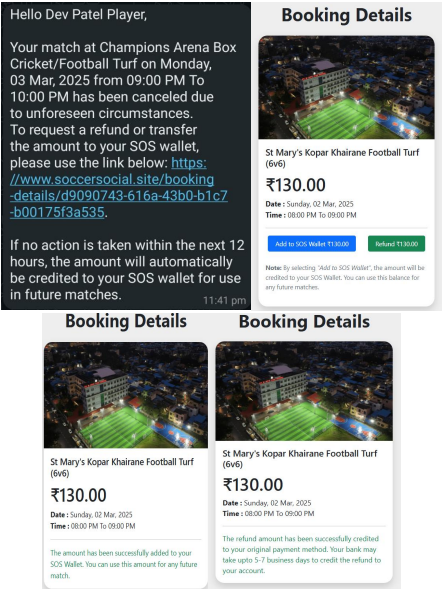
If no option is selected within 12 hours of Game Cancellation, the amount will automatically be added to your SOS Wallet.
Refunds are given ONLY when the game is cancelled due to a lack of players, heavy rains, or unplayable conditions, such as a power cut at the venue. Refunds are initiated bank-to-bank by a secured gateway like Razorpay. Your Refunds usually take 5-7 Business Days to get reflected in your BANK PASSBOOK or BANK STATEMENT. It DOES NOT get reflected in your UPI App.
In the case of payments made via payment wallets (e.g., FamPay, MobiKwik), the refund is reflected in the wallet itself within 5-7 Business days.
In the case of payments made via credit cards, the amount appears on your credit card statement as a statement credit within 5-7 Business days
If you have any questions regarding refunds or payments, please contact us at https://www.sportssocial.in/contact-us or call us at 07965211665.
If you've chosen for a refund, it won't appear in your UPI app transactions. To see the amount that is refunded for surety purposes, check your bank statement from your bank mobile application or update your passbook as it is a bank-to-bank transaction. The refund is credited by the name of various refund banking terms. Here are some common terms you might see when receiving a refund: CRADJ – Credit Adjustment, UPIRET – UPI Return, UPIREV – UPI Reversal, REVERSAL – Transaction Reversed, REFUND – Refund Processed, TDR – Transaction Declined & Reversed, AUTO CREDIT – Automatically Credited Amount, NEFT-REFUND – Refund via NEFT Transfer, IMPS CR – IMPS Credit (Refund via IMPS), RTGS CR – RTGS Credit (Refund via RTGS), RETXN – Returned Transaction, PAYBACK – Amount Returned to Source, CREDITN – Credited Amount, ADJ CR – Adjustment Credit. Please note that abbreviations can vary between banks and regions. For specific terms on your statement, it's best to consult your bank's official resources or contact their customer service for clarification.
You can view your SOS Wallet balance on our platform. When booking your next game, proceed to the payment page and fill in your details. A "Redeem" icon willappear if you have a balance. An OTP is generated when you click on redeem, so that only you can redeem the amount and no one else can, this will allow you to use yourwallet balance for the booking. If the game fee exceeds your wallet balance, you'll need to pay the difference. If the fee is less, the remaining balance stays in your wallet for future use. If the game in which you redeemed your amount gets canceled, your amount is by default added back to your SOS Wallet. In the next slide, the whole redeem process is being demonstrated with an example for better understanding.
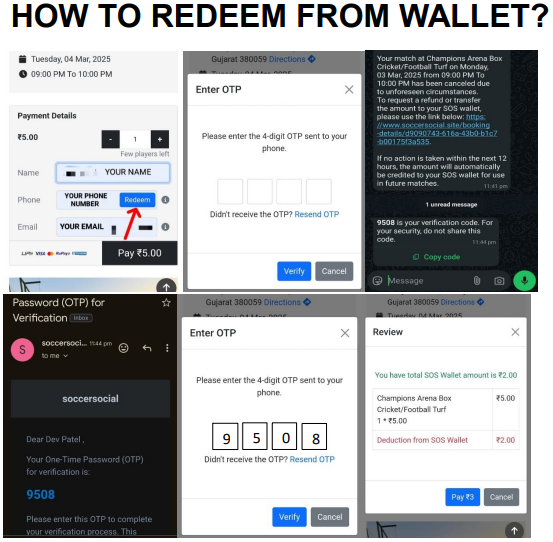
The SOS Wallet process works as follow:
A game at Champions Arena priced at ₹2 on March 3, 2025, was canceled. Players received a WhatsApp notification about the cancellation one hour before the game. The player chose to add the ₹2 to their SOS Wallet.
Later, they found a game they wanted to join. After clicking the event and entering their Name, Phone Number & Email, a "Redeem" icon appeared next to the phone number (only if they had wallet balance). Upon clicking it, an OTP was sent via WhatsApp & Email.
After entering the OTP, a balance statement popped up:
This demonstrates how the SOS Wallet works in different scenarios.
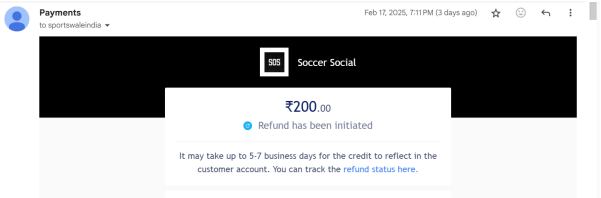
Once we initiate the refund, a confirmation email will be sent to your email ID (the email
ID that was used at the time of the transaction). This means that the refund is successful from our
end.
You may check the status of the refund using the Razorpay payment ID or refund ID from the
mail itself.
For details on the refund process, please refer to our refund document.
To understand that, you need to first understand how refunds work, below is a detailed guide on how refunds work.
Refund initiated means the merchant or business has initiated the process of refunding your money to the source of payment.
Sports Social now makes a refund request or provides online refund status via their
Payment Gateway (Razorpay). Razorpay conveys this information to their acquiring bank (the bank with
which they have an account) via APIs.
This acquiring bank has to communicate with the issuing
bank (the bank in which the customer account/card is held), which was used for the payment, and raise a
refund request.
Ideally, the refund request is accepted, filed, and then processed by the
issuing bank to provide online refund status to the customer. On completion of this process, refunds are
reflected in the customer’s account/card balance.
Refund processed means Sports Social has completed the process and the amount has been transferred to your payment source.
An online refund status thus involves an exchange of information between 3-4 different
parties. Each of these parties has its mechanisms to file the refund request, map it to their respective
payments that were originally made, and then process it forward.
Many of these processes in the
banking ecosystem are not fully automated and require manual oversight. Given the number of parties
involved and the variance in their processes to handle refunds, it takes 5-10 days for them to be
credited back to the customer account. So, if you are waiting for an online refund status, then you will
have to wait for some time.
There are about 5 major payment gateways working in the country, 5-6 major acquiring banks
that help process payments, and about 60 banks that allow for the functionality of payments via net
banking or their card network.
Each refund has to go through at least these three parties, and
the flow of communication for each refund varies as per the combination of these 3 parties. Sometimes a
refund request gets dropped in the process due to system/network failures and you won’t get the online
refund status. Whenever this happens, the refund may stay in limbo, until the refund request is
initiated again.
We do not take responsibility for Players not Showing up at the venue. After making payment if the player doesn't show up we are not liable to provide refunds, carry forward for SOS Credits to any players.